
Key Features
-
Lightweight Shortcode Implementation: Easily embed and display the generator anywhere on your site using
[xml_sitemap_generator]. -
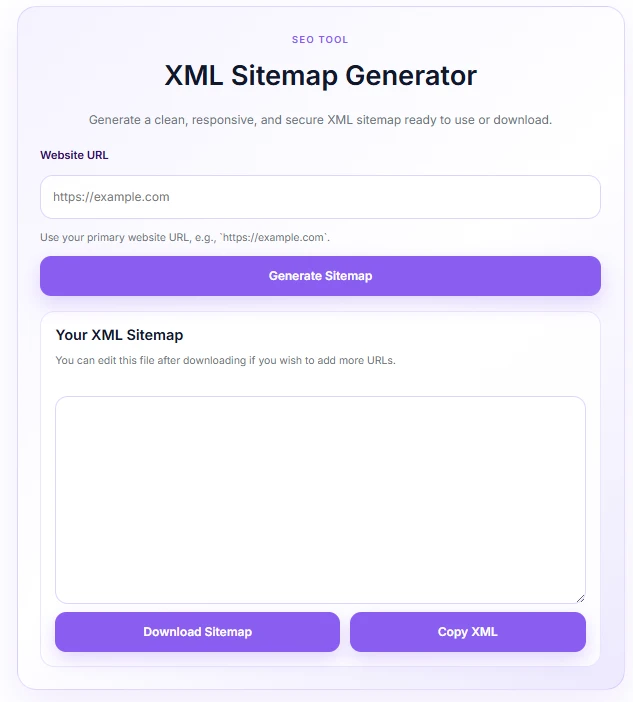
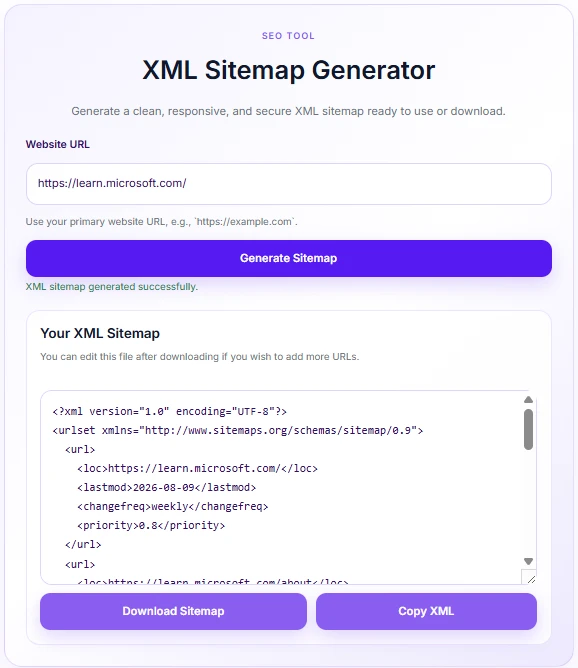
AJAX-Powered Generation: Instantly generates clean XML sitemaps in real-time without reloading the page.
-
Security & Input Sanitization: Features strict URL validation, scheme/protocol checks, and nonces to protect against malicious inputs and SSRF vectors.
-
Modern Soft Purple Interface: Built with a fully responsive, clean, and elegant UI styled in modern purple tones.
-
One-Click Download & Copy: Users can instantly copy the generated XML code to their clipboard or download it directly as a
.xmlfile. -
Fully Translatable (i18n): All front-end messages and status alerts are written in clean English and ready for localization.
Ideal For
-
SEO Professionals & Agencies: Quickly generate standard XML sitemaps for clients or audit projects.
-
Tool & Utility Websites: Perfect for webmasters running online web developer or SEO toolkits.
-
WordPress Site Owners: Ideal for anyone needing a simple, lightweight utility to complement their site without heavy plugin overhead.
Key Benefits
-
Zero Database Overhead: Generates sitemaps on-the-fly without cluttering your WordPress database or saving temporary files on your server.
-
Seamless User Experience: Smooth AJAX interactions with clear success and error feedback for end-users.
-
Fast & Lightweight: Negligible impact on page load speed—loads CSS and JavaScript assets inline only when the shortcode is present.
-
Enhanced Security: Sanitizes inputs to ensure credentials or disallowed schemes are stripped automatically.
Installation Guide
You can set up this snippet in a few simple steps:
Method 1: Using the Code Snippets Plugin (Recommended)
-
Install and activate the free Code Snippets plugin from the WordPress repository.
-
Go to Snippets → Add New in your WordPress dashboard.
-
Paste the provided PHP code into the code editor.
-
Set the code type to PHP Snippet.
-
Click Save Changes and Activate.
Method 2: Via Theme functions.php
-
Go to Appearance → Theme File Editor (or access your server via FTP/cPanel).
-
Open your active child theme’s
functions.phpfile. -
Paste the PHP code at the end of the file.
-
Save the file.
How to Display the Tool on Your Site:
Add the following shortcode to any Page, Post, or Custom Post Type:
[xml_sitemap_generator]Compatibility
-
WordPress Version: Compatible with WordPress 5.0 and higher (including WP 6.x).
-
PHP Version: Requires PHP 7.4 or higher (PHP 8.0+ supported).
-
Browser Compatibility: Fully functional on all modern web browsers (Chrome, Edge, Firefox, Safari) and mobile devices.
-
Theme / Plugin Compatibility: Works seamlessly with Block Editor (Gutenberg), Elementor, Divi, and standard classic editors.
What You Will Get
-
Clean XML Output: Compliant with standard Sitemaps.org protocol (
[http://www.sitemaps.org/schemas/sitemap/0.9](http://www.sitemaps.org/schemas/sitemap/0.9)). -
Automated URL Structuring: Generates standard default routes (
/,/about,/contact,/services,/blog) based on the submitted base domain. -
Built-in Clipboard & File Handling: Includes JavaScript functionality for background copying and instant
.xmlfile downloads.
FAQ (Frequently Asked Questions)
-
Q: Does this plugin create a physical file on my server?
-
A: No. The sitemap is generated dynamically in memory via AJAX and served directly to the user’s browser. It does not write files to your server storage.
-
-
Q: Can I add custom URLs or edit the sitemap after generation?
-
A: Yes. Once generated, users can either copy the XML text to edit manually or download the
.xmlfile and modify it using any text editor before submitting it to search engines.
-
-
Q: Why am I getting an invalid URL error?
-
A: The generator requires a full URL format with a valid scheme, such as
[https://example.com](https://example.com). URLs with credentials, missing schemes, or improper structures will be rejected for security reasons.
-
Disclaimers & Notes
-
HTTPS Protocol Recommended: The copy-to-clipboard feature utilizes the browser’s native
navigator.clipboardAPI, which requires an active SSL certificate (https://) to work consistently. -
Modifying Default Routes: If you want to customize the default URL paths generated by the shortcode, you can modify the
$default_urlsarray inside thexsg_generate_sitemap_xmlPHP function.
Preview




Reviews
There are no reviews yet.