Key Features
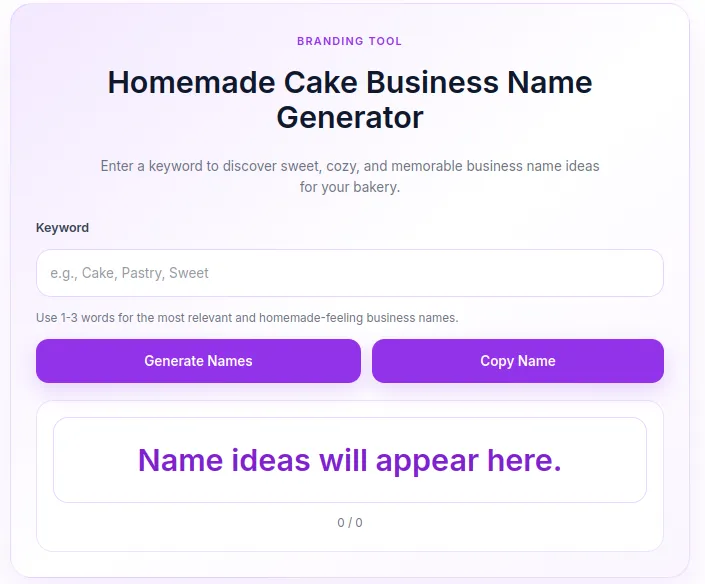
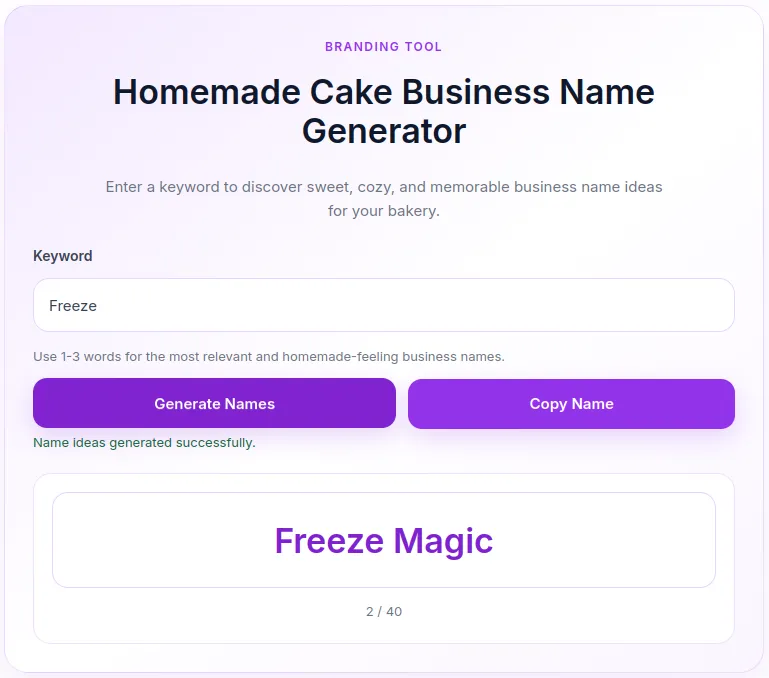
- Smart Name Combination Engine: Generates up to 40 unique, memorable, and charming bakery name suggestions per search using clean randomization logic.
- AJAX-Powered Performance: Fetches name ideas dynamically in real-time without requiring a full page refresh, delivering a smooth user experience.
- Soft Purple Aesthetic Theme: Features a modern pastel design system with subtle gradients, soft lavender accents, and responsive card containers.
- One-Click Copy to Clipboard: Integrated custom JavaScript function allowing users to instantly copy their favorite generated name with real-time feedback messages.
- Interactive Counter & Navigation: Tracks displayed names sequentially (e.g.,
1 / 40), enabling visitors to cycle through ideas effortlessly. - Localization & Custom i18n Ready: All user-facing text strings are defined within structured JavaScript configurations for easy translation.
- Robust Security & Validation: Includes built-in WordPress Nonce security checks and input length sanitization (max 60 characters) to prevent abuse.
Ideal For
- Bakery & Confectionery Websites: Niche blogs, home-baking portals, or culinary advice sites wanting an interactive branding tool.
- Branding & Small Business Agencies: Platforms assisting food entrepreneurs, artisan bakers, and startup owners in choosing brand names.
- WordPress Content Creators: Website owners seeking to boost visitor engagement, interactive retention, and dwell time.
- Micro-SaaS & Affiliate Blogs: Monetized portals offering domain registration or branding services to new business owners.
Key Benefits
- Drives Visitor Engagement: Keeps users actively interacting with your web page as they click to discover new business names.
- Ultra-Lightweight & Fast: Built using pure PHP, native CSS, and Vanilla JavaScript with zero external heavy libraries or frameworks.
- Zero Asset Bloat: Styles and scripts are registered and enqueued conditionally, ensuring no speed impact on other pages of your site.
- Clean CSS Scoping: Designed with scoped CSS custom variables (
--hcn-purple,--hcn-bg) to prevent conflicts with your active theme styles.
Installation Guide
You can set up this snippet in a few simple steps:
Method 1: Using the Code Snippets Plugin (Recommended)
-
Install and activate the free Code Snippets plugin from the WordPress repository.
-
Go to Snippets → Add New in your WordPress dashboard.
-
Paste the provided PHP code into the code editor.
-
Set the code type to PHP Snippet.
-
Click Save Changes and Activate.
Method 2: Via Theme functions.php
-
Go to Appearance → Theme File Editor (or access your server via FTP/cPanel).
-
Open your active child theme’s
functions.phpfile. -
Paste the PHP code at the end of the file.
-
Save the file.
How to Display the Tool on Your Site:
Add the following shortcode to any Page, Post, or Custom Post Type:
[bakery_name_generator]Compatibility
- WordPress Version: Compatible with WordPress 5.0 and higher.
- PHP Compatibility: PHP 7.4 up to PHP 8.3+.
- Page Builders: Works seamlessly with Gutenberg, Elementor, Divi, Beaver Builder, Bricks, Oxygen, and WPBakery.
- Cross-Browser & Mobile: Fully responsive across Chrome, Safari, Firefox, Edge, iOS, and Android mobile browsers.
What You Will Get
- Clean PHP Source Code: Production-ready snippet including shortcode rendering, AJAX endpoints, and dynamic logic.
- Soft Purple Inline CSS: Complete responsive styling with elegant hover states, focus outlines, and mobile layout adjustments.
- Vanilla JavaScript Script: Lightweight script handling asynchronous fetch calls, state tracking, and fallback clipboard functionality.
- Ready-to-Use Shortcode: Shortcode tag
[bakery_name_generator]for immediate placement anywhere on your site.
FAQ (Frequently Asked Questions)
-
Q:How do I display the name generator on my website?
-
A: Simply edit your target post or page and insert the shortcode
[bakery_name_generator]inside a Shortcode or HTML block.
-
-
Q: Can I change the soft purple color palette to match my brand?
-
A: Yes! You can easily edit the CSS variables (e.g.,
--hcn-purple,--hcn-border) inside thehcn_enqueue_assets()function to any color hex code of your choice.
-
-
Q: Will this code affect my website’s loading speed?
-
A: No. The snippet only loads its CSS and JS when the shortcode is active on the page, keeping your site fast and optimized.
-
-
Q: What happens if a user submits an empty keyword?
-
A: The tool validates the input on both client and server sides, displaying a soft error message asking the user to provide a keyword first.
-
Disclaimers & Notes
- Child Theme Recommendation: If adding the snippet directly to
functions.php, always use a child theme so your custom code isn’t overwritten during theme updates. - Purge Cache After Install: If using caching plugins (e.g., WP Rocket, LiteSpeed Cache), make sure to clear your site cache after activating the code.
- HTTPS Requirement for Copy Feature: The automated copy-to-clipboard function relies on modern browser APIs (
navigator.clipboard), which require an active SSL certificate (HTTPS).
Preview
Reviews
There are no reviews yet.