Key Features
-
Instant QR Generation: Converts any standard URL into a high-resolution QR code instantly via client-side JavaScript.
-
Direct Image Download: Features an integrated download action so visitors can save the generated PNG file with a single click.
-
Modern Soft Purple Design: Comes pre-styled with a clean lavender/soft purple palette, soft background gradients, and smooth hover effects.
-
Fully Responsive: Automatically adapts to desktop, tablet, and mobile layouts with fluid typography and form fields.
-
Error & Form Validation: Built-in URL verification ensures users input full protocols (e.g.,
https://) before processing.
Ideal For
-
Marketing & Business Websites: Quickly sharing landing pages, promotional offers, or social links.
-
Events & Portfolios: Allowing visitors to save event links, digital vCards, or project URLs to their smartphones.
-
E-Commerce Stores: Directing buyers to specific product lines or checkout pages via printable codes.
Key Benefits
-
Lightweight & Fast: Enqueues assets inline only when needed, avoiding site bloat or slow page loading times.
-
Zero External Dependencies: Works seamlessly out of the box using core WordPress shortcode hooks and native JavaScript.
-
Translation-Ready Structure: Built with clear string arrays so you can easily adapt text for localized audiences.
Installation Guide
You can set up this snippet in a few simple steps:
Method 1: Using the Code Snippets Plugin (Recommended)
-
Install and activate the free Code Snippets plugin from the WordPress repository.
-
Go to Snippets → Add New in your WordPress dashboard.
-
Paste the provided PHP code into the code editor.
- Replace
const qrUrl = 'YOUR_URL_API_QR_CODE_GENERATOR_HERE';with your preferred QR code generator API URL. -
Set the code type to PHP Snippet.
-
Click Save Changes and Activate.
Method 2: Via Theme functions.php
-
Go to Appearance → Theme File Editor (or access your server via FTP/cPanel).
-
Open your active child theme’s
functions.phpfile. -
Paste the PHP code at the end of the file.
- Replace
const qrUrl = 'YOUR_URL_API_QR_CODE_GENERATOR_HERE';with your preferred QR code generator API URL. -
Save the file.
How to Display the Tool on Your Site:
Add the following shortcode to any Page, Post, or Custom Post Type:
[qr_generator]Compatibility
-
WordPress Version: 5.0 or higher
-
PHP Version: 7.4 or higher (fully compatible with PHP 8.x)
-
Browsers: Chrome, Safari, Firefox, Edge, and modern mobile browsers
What You Will Get
-
Complete PHP snippet containing HTML structural markup, CSS inline styling, and JS functional scripts.
-
Ready-to-use
[qr_generator]shortcode for pages, posts, or sidebars. -
Built-in i18n structure configured in English.
FAQ (Frequently Asked Questions)
-
Q: How do I display the QR Code Generator on a page?
-
A: Add a Shortcode Block in the Gutenberg editor (or your page builder) and insert
[qr_generator].
-
-
Q: Where are the generated QR codes hosted?
-
A: Codes are generated dynamically on the fly via standard HTTP API requests and rendered directly on the browser preview.
-
-
Q: Can I customize the primary purple color?
-
A: Yes. Edit the
--qrg-purpleand--qrg-purple-darkvariables in the CSS section of the code snippet.
-
Disclaimers & Notes
-
Active Child Theme: If modifying
functions.phpdirectly, always use a child theme so changes aren’t overwritten during main theme updates. -
Protocol Requirement: Users must enter full URLs starting with
http://orhttps://to generate a valid code.
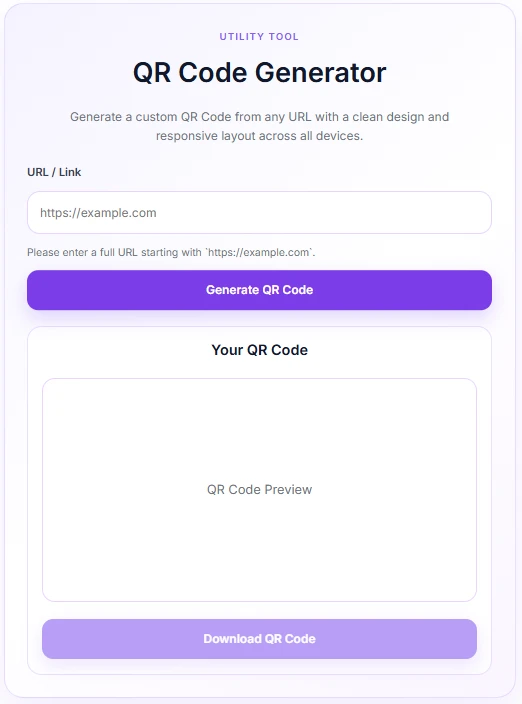
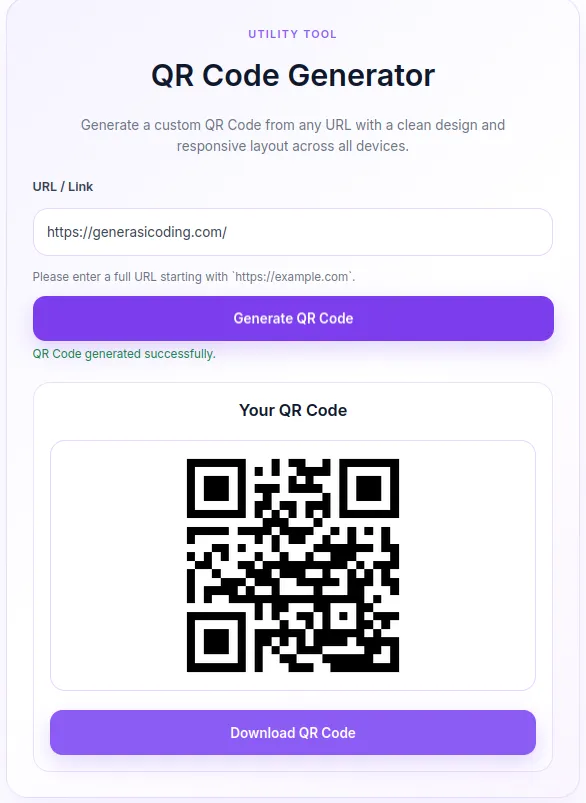
Preview





Reviews
There are no reviews yet.