
Key Features
-
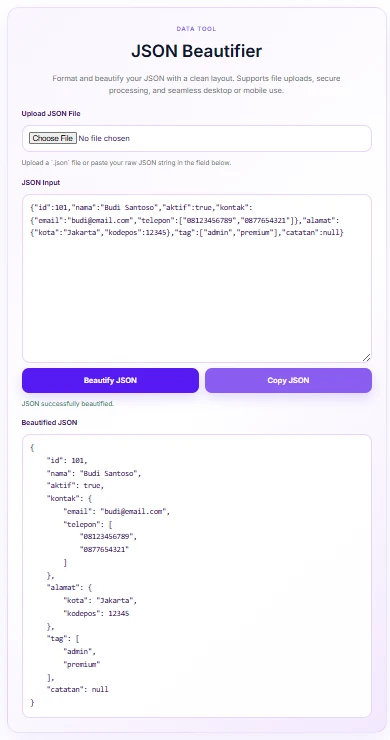
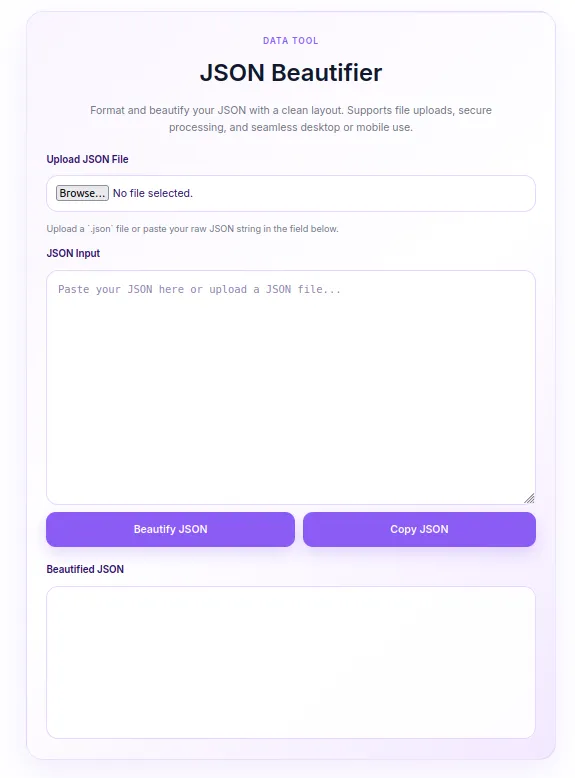
Instant JSON Beautification: Automatically formats cluttered or minified JSON strings into clean, readable, indented structures with a single click.
-
Direct File Upload: Seamlessly upload
.jsonfiles (up to 2 MB) to parse and display contents directly in the input area. -
One-Click Copy: Easily copy beautified JSON outputs to your clipboard with smart fallback support for all browser environments.
-
Real-Time Validation & Error Handling: Instantly detects invalid JSON syntax or file size limits with helpful status messages.
-
Client-Side & Secure Processing: All parsing and formatting happen entirely inside the user’s browser—your data is never sent to external servers or stored in the database.
-
Soft Purple Aesthetic: Elegant lavender-themed design, fully responsive and optimized for mobile and desktop displays.
Ideal For
-
Web Developers & Programmers: Quick tool for formatting API responses, configuration files, and debugging raw JSON strings on the fly.
-
Data Analysts & Marketers: Easily view, inspect, and copy structured JSON data without needing complex IDEs or external software.
-
WordPress Site Owners: Offer a helpful, interactive utility tool on your blog, documentation portal, or developer resources page.
Key Benefits
-
Zero Bloat: Lightweight asset loading with zero external library dependencies (pure native JavaScript and WordPress APIs).
-
Fully Custom Styles: Inline, scoped CSS prevents styling conflicts with your parent theme or other plugins.
-
Translation-Ready Structure: Built with organized JS i18n configurations for quick localized messaging.
-
Improved User Engagement: Adds functional value to your website, keeping developer-focused audiences on your site longer
Installation Guide
You can set up this snippet in a few simple steps:
Method 1: Using the Code Snippets Plugin (Recommended)
-
Install and activate the free Code Snippets plugin from the WordPress repository.
-
Go to Snippets → Add New in your WordPress dashboard.
-
Paste the provided PHP code into the code editor.
-
Set the code type to PHP Snippet.
-
Click Save Changes and Activate.
Method 2: Via Theme functions.php
-
Go to Appearance → Theme File Editor (or access your server via FTP/cPanel).
-
Open your active child theme’s
functions.phpfile. -
Paste the PHP code at the end of the file.
-
Save the file.
How to Display the Tool on Your Site:
Simply place the shortcode [json_beautifier] into any page, post, or block editor widget where you want the tool to appear!
Compatibility
-
WordPress Version: WordPress 5.0 or higher (fully compatible with Gutenberg Block Editor and Classic Editor).
-
PHP Version: PHP 7.4 or higher (including PHP 8.x).
-
Browser Support: Modern web browsers (Google Chrome, Mozilla Firefox, Apple Safari, Microsoft Edge, Opera).
-
Device Responsiveness: Fully adaptive to mobile screens, tablets, and desktop displays.
What You Will Get
-
1 Complete PHP Code Snippet containing shortcode functionality, CSS styling, and JavaScript logic.
-
Ready-to-use Shortcode:
[json_beautifier] -
Customizable Soft Purple UI Theme embedded directly within the snippet CSS.
FAQ (Frequently Asked Questions)
-
Q: Is my JSON data saved or logged on the server?
-
A: No. All processing is strictly client-side using JavaScript. Your JSON data never touches the WordPress database or any remote server.
-
-
Q: Can I change the color scheme back to another color?
-
A: Yes! You can edit the CSS custom variables inside the snippet (
--jbt-purple,--jbt-purple-dark,--jbt-bg) to match your brand’s color palette.
-
-
Q: What is the maximum file size for JSON uploads?
-
A: The default limit is set to 2 MB to ensure smooth browser performance during formatting.
-
Disclaimers & Notes
-
Child Theme Recommended: If you are pasting the code directly into
functions.php, always use a Child Theme. Direct edits to a main theme’sfunctions.phpwill be overwritten when the theme updates. -
Valid Formatting Required: The tool validates syntax using native
JSON.parse(). If your JSON contains syntax errors (like missing quotes or unclosed brackets), an error message will prompt you to check your syntax.
Preview




Reviews
There are no reviews yet.