
Key Features
-
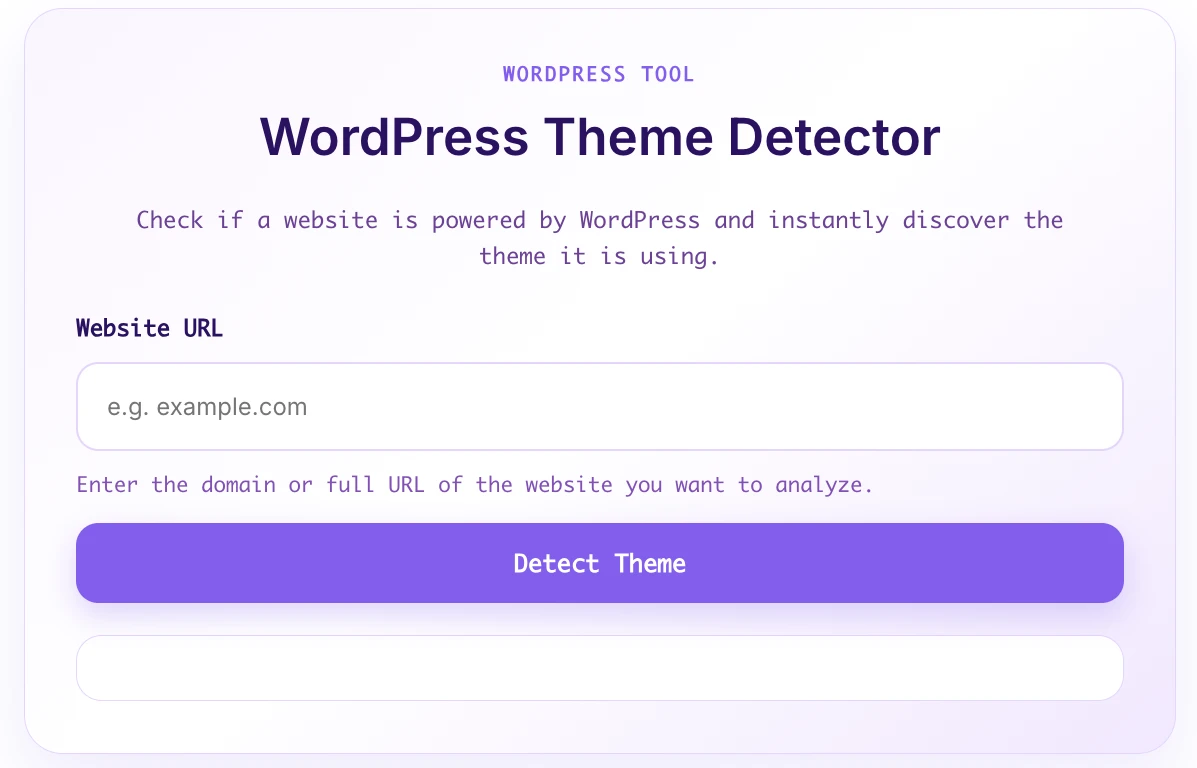
Automatic URL Formatting: Users can simply type a domain name (e.g.,
example.com), and the system automatically prepends the requiredhttps://protocol. -
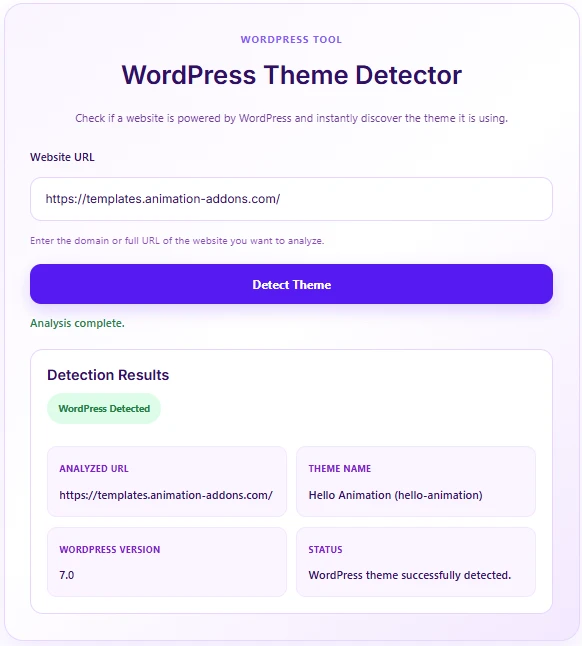
Fast & Accurate Detection: Deep inspection of source code, directory structures, and meta tags to pinpoint theme details and WordPress core versions accurately.
-
Modern & Responsive UI: Designed with a clean, card-style layout in a Soft Purple color palette that looks crisp on desktop, tablet, and mobile devices.
-
Asynchronous AJAX Request: Runs checks seamlessly in the background without refreshing the page, delivering a smooth user experience.
-
Built-in Security & Validation: Includes strict URL validation, blocking of private/internal hosts, and AJAX nonce verification for top-tier security.
-
Zero External Dependencies: Built with pure WordPress core standards—no heavy third-party libraries required.
Ideal For
-
Tech & Web Design Blogs: Provide an interactive utility for readers wanting to discover themes used by sites they admire.
-
Agencies & Freelancers: Use it as a free, value-adding lead magnet to attract potential clients to your agency site.
-
Developer Communities & Portals: Offer a handy, free online tool for fellow web developers and designers.
-
Hosting & Domain Providers: Enhance your utility offerings for users researching competitors or client sites.
Key Benefits
-
Boosts Traffic & Engagement: Interactive tools significantly increase time-on-site and encourage repeat visitor traffic.
-
Effective Lead Magnet: A polished, professional interface builds trust and helps drive conversions for your services.
-
Lightweight & Server-Friendly: Clean, optimized code ensures your server maintains high performance with minimal resource usage.
-
Easy Customization: Structured following WordPress coding standards, making it effortless to customize styles or features if needed.
Installation Guide
Setting up the tool takes only a few minutes:
Method 1: Using the Code Snippets Plugin (Recommended)
-
Install and activate the Code Snippets plugin from the WordPress repository.
-
Go to Snippets > Add New.
-
Name your snippet (e.g., WP Theme Detector) and select PHP Snippet.
-
Paste the provided PHP code into the code editor.
-
Save and click Activate.
Method 2: Via Theme’s functions.php
-
In your WordPress dashboard, navigate to Appearance > Theme File Editor (or via FTP/cPanel).
-
Open the
functions.phpfile of your active child theme. -
Paste the code at the very bottom of the file.
-
Click Update File.
Displaying the Tool on Your Site:
Simply insert the following shortcode into any Page, Post, or Widget area where you want the tool to appear:
Compatibility
-
WordPress Versions: Fully compatible with WordPress 5.6 up to the latest releases (6.x+).
-
PHP Versions: Tested and working seamlessly on PHP 7.4, 8.0, 8.1, 8.2, and 8.3+.
-
Page Builders: Compatible with all major builders, including Gutenberg Block Editor, Elementor, Divi, Beaver Builder, and Bricks Builder.
-
Browsers: Cross-browser tested on Chrome, Edge, Safari, Firefox, and Opera across all platforms.
What You Will Get
-
Full PHP Snippet Source Code: Clean, well-commented, and fully aligned with WordPress coding standards.
-
Built-in Soft Purple CSS & JS Assets: Inline auto-loading styles and scripts.
-
English Copywriting & Translations: Fully localized interface, messages, and error statuses.
-
Comprehensive Documentation: Easy setup instructions and unlimited personal/commercial site usage.
FAQ
Q: Can this tool detect every WordPress website?
A: It detects the majority of standard WordPress websites. However, if a target site uses aggressive security plugins, custom proxy setups, or security obfuscation to hide its WordPress structure, theme details may be hidden by design.
Q: Can I change the color scheme of the interface?
A: Absolutely! You can easily customize the CSS variables (such as --ctw-purple) inside the code to match your brand’s unique color palette.
Q: Will this plugin slow down my website?
A: Not at all. The CSS and JS assets are loaded inline only on pages where the [cek_tema] shortcode is present, leaving the rest of your site completely unaffected.
Q: Is it safe against malicious requests or abuse?
A: Yes. The code includes input sanitization, safe URL handling, nonce checks, and private IP blocking to protect your server against SSRF (Server-Side Request Forgery) attacks.
Disclaimers & Notes
-
Detection accuracy relies on the HTTP response from the target website. If the target server is down or blocking requests from your host, the check will return an error message.
-
It is strongly recommended to add the snippet via a Child Theme or the Code Snippets plugin so your code isn’t overwritten during parent theme updates.
Preview



Reviews
There are no reviews yet.