
Key Features
-
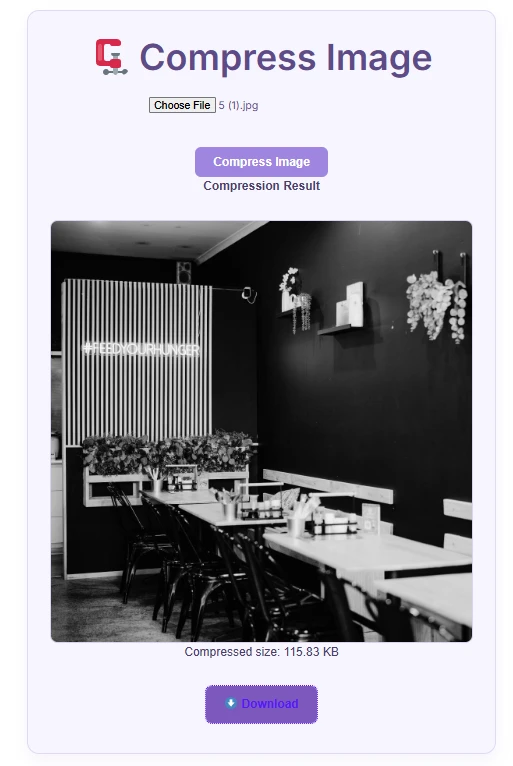
TinyPNG API Integration: Utilizes TinyPNG’s smart lossy compression algorithms to significantly reduce image file sizes without sacrificing visual quality.
-
Asynchronous AJAX Processing: File upload and image compression execute seamlessly in the background without requiring a full page refresh.
-
Instant Preview & File Size Indicator: Displays a live preview of the compressed image along with the final file size in KB immediately after processing.
-
Base64 Conversion & Direct Download: Converts images into Base64 Data URIs so users can download their files instantly without clogging your WordPress Media Library.
-
Modern Soft Purple UI: Features a clean, elegant pastel purple design that naturally blends into modern web themes.
-
Simple Shortcode Deployment: Easily place the tool anywhere on your site using a single, lightweight shortcode.
Ideal For
-
E-Commerce & Online Stores: Provides a free tool for vendors and customers to optimize product photos before uploading.
-
Blogs & Content Websites: Helps writers compress images on the fly to keep page loading times fast.
-
Agencies & Web Tool Hubs: Serves as a valuable free utility or lead magnet to increase user engagement and site traffic.
-
Freelancers & Developers: A lightweight solution for clients who need on-page image compression without installing heavy plugins.
Plugin Benefits
-
Saves Server Storage: Compressed images are delivered directly to the browser as Base64 strings, leaving no temporary files on your server.
-
Boosts User Engagement: Encourages visitors to spend more time on your site using a helpful online utility tool.
-
Ultra Lightweight: Does not create extra database tables or load heavy external libraries.
-
Privacy Friendly: Direct file handling ensures user images are not stored permanently in your WordPress database or uploads directory.
How to Install
Method 1: Using the Code Snippets Plugin (Recommended)
-
Go to your WordPress Dashboard and navigate to Plugins > Add New.
-
Search for Code Snippets, click Install, and then Activate.
-
Go to Snippets > Add New.
-
Set a title (e.g., TinyPNG Image Compressor Tool) and select PHP Snippet.
-
Copy and paste the provided PHP code into the code editor.
-
Replace
'YOUR_TINYPNG_API_KEY_HERE'in the code with your actual API key from api.tinify.com. -
Click Save Changes and Activate.
Method 2: Adding to theme functions.php
-
Navigate to Appearance > Theme File Editor.
-
Open your active child theme’s
functions.phpfile. -
Paste the code at the bottom of the file and enter your TinyPNG API Key.
-
Click Update File.
How to Display the Tool:
Insert the following shortcode into any page, post, or widget area:
[compress_image]Compatibility
-
WordPress Version: Fully compatible with WordPress 5.0 up to the latest version (6.x+).
-
PHP Version: Optimized for PHP 7.4, 8.0, 8.1, 8.2, and 8.3+.
-
Server Requirements: Requires the PHP cURL extension enabled on your web host.
-
Page Builders: Works smoothly with Elementor, Gutenberg, Divi, Beaver Builder, Bricks, and default theme builders.
-
Browsers: Tested on Google Chrome, Mozilla Firefox, Safari, Microsoft Edge, and Opera.
What You Will Get
-
Clean PHP Snippet Code: Well-structured script integrated with WordPress’s native AJAX framework (
admin-ajax.php). -
Embedded Soft Purple CSS & JS: Built-in responsive styles and frontend script handlers.
-
Interactive Error Handling: Helpful alert messages if no file is selected or if an API connection error occurs.
FAQ (Frequently Asked Questions)
Q: Where can I get a TinyPNG API Key?
A: You can register for a free account at tinify.com / tinypng.com/developers. The free tier provides up to 500 compressions per month.
Q: Are user images saved on my WordPress server?
A: No. Compressed images are converted straight into Base64 format for browser download, consuming zero hosting storage space.
Q: What file formats are supported?
A: It supports standard web formats including JPG, JPEG, PNG, and WEBP.
Q: Can I customize the purple theme or styling?
A: Yes. You can easily tweak the CSS code inside the .compress-box and button classes to match your brand colors.
Notes
-
Enable PHP cURL: Ensure cURL is enabled on your hosting server to allow secure API calls to TinyPNG.
-
Use a Child Theme: If adding code to
functions.php, always use a Child Theme so your customizations aren’t overwritten during theme updates.
Preview





Reviews
There are no reviews yet.