
Key Features
-
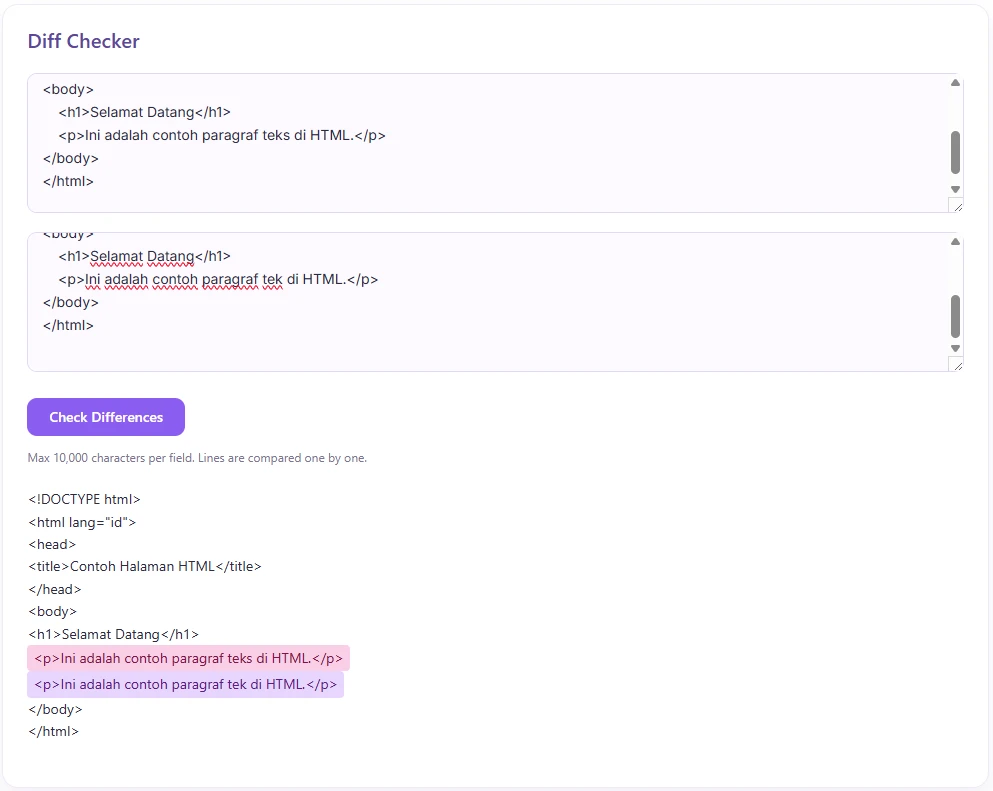
Instant Line-by-Line Comparison: Automatically highlights added and removed lines between two text inputs.
-
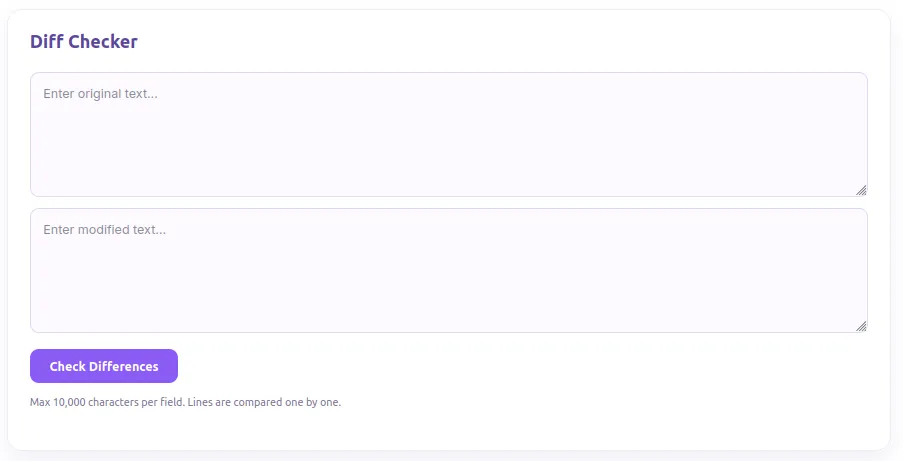
Modern Soft Purple Design: Styled with a clean, pastel-inspired UI that seamlessly fits modern web designs.
-
AJAX-Powered Processing: Performs diff checks dynamically without reloading the entire web page.
-
Character Limit Protection: Built-in safeguards preventing inputs over 10,000 characters per field to maintain site performance.
-
Built-in Security: Secured with WordPress Nonce verification and sanitized inputs against XSS and unauthorized AJAX calls.
-
Lightweight Shortcode: Simply place
[diff_checker]on any post, page, or widget area.
Ideal For
-
Developers & Coders: Quickly compare code snippets, config files, or scripts.
-
Content Editors & Writers: Spot revision changes, draft edits, or article updates effortlessly.
-
Translators: Compare original vs. updated translations line by line.
-
Students & Educators: Check differences between essay drafts or reference notes.
Key Benefits
-
Saves Time: No need to manually read through long texts to find minor edits or typos.
-
Zero Database Overhead: Executes lightweight checks in real-time without storing user input in your database.
-
Fully Responsive: Works smoothly across mobile phones, tablets, and desktop displays.
-
Seamless UI Integration: Matches modern web trends with soft lavender tones that won’t clash with your site’s branding.
Installation Guide
You can set up this snippet in a few simple steps:
Method 1: Using the Code Snippets Plugin (Recommended)
-
Install and activate the free Code Snippets plugin from the WordPress repository.
-
Go to Snippets → Add New in your WordPress dashboard.
-
Paste the provided PHP code into the code editor.
-
Set the code type to PHP Snippet.
-
Click Save Changes and Activate.
Method 2: Via Theme functions.php
-
Go to Appearance → Theme File Editor (or access your server via FTP/cPanel).
-
Open your active child theme’s
functions.phpfile. -
Paste the PHP code at the end of the file.
-
Save the file.
How to Display the Tool on Your Site:
Add the following shortcode to any Page, Post, or Custom Post Type:
[diff_checker]Compatibility
-
WordPress Version: 5.0 or higher
-
PHP Version: 7.4 or higher (fully compatible with PHP 8.x)
-
Page Builders: Compatible with Elementor, Gutenberg, Divi, Beaver Builder, and Classic Editor.
-
Browsers: Fully supported on Chrome, Safari, Firefox, Edge, and Opera.
What You Will Get
-
Clean PHP & CSS Snippet: Ready to copy, paste, and deploy in seconds.
-
Pre-Styled Front-End UI: Beautiful soft-purple card layout requiring zero extra CSS setup.
-
Embedded JavaScript Engine: Handles AJAX form submissions and dynamic error messaging out of the box.
FAQ (Frequently Asked Questions)
-
Q: Does this plugin save any submitted text to my WordPress database?
-
A: No. All comparisons are processed on the fly and returned directly to the user’s screen. No data is stored.
-
-
Q: Can I change the maximum character limit?
-
A: Yes. You can edit the
$max = 10000;variable in the PHP code to increase or decrease the allowed limit.
-
-
Q:How do I display the Diff Checker on a page?
-
A: Simply paste the shortcode
[diff_checker]into any WordPress page, post, or widget area.
-
-
Q:Why are line breaks crucial for the comparison?
-
A: The current comparison algorithm checks differences line by line (split by newlines), making it ideal for code, lists, and structured paragraphs.
-
Disclaimers & Notes
- Important: Always test new code snippets in a staging environment before pushing them live to production. If you customize the CSS classes (
.dc-card,.dc-btn,.added,.removed), ensure your theme stylesheets do not override the default styles.
Preview





Reviews
There are no reviews yet.