Key Features
-
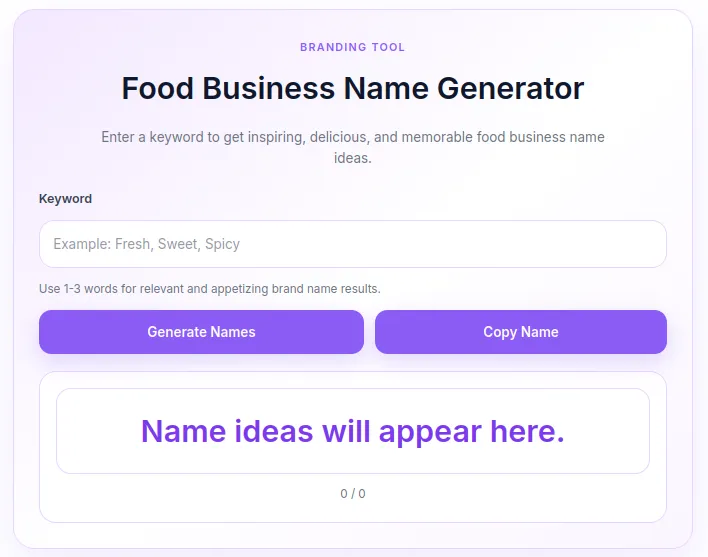
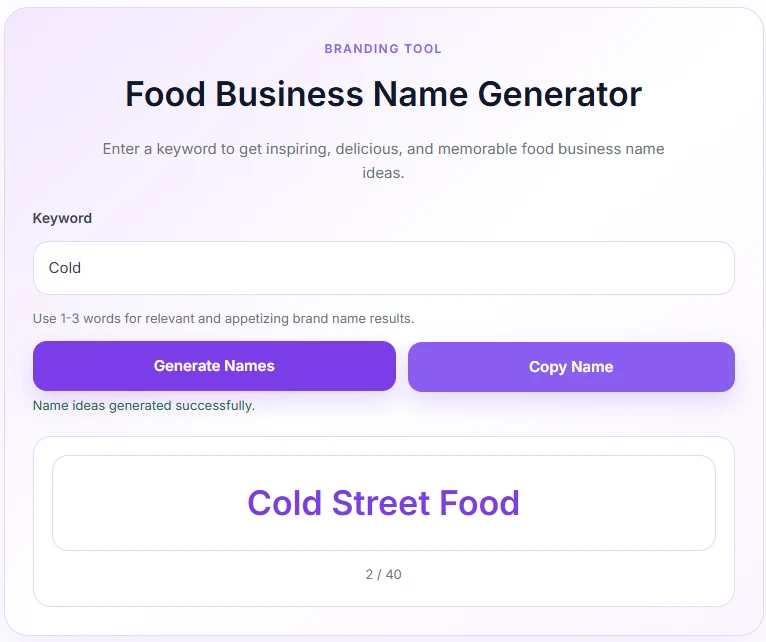
Instant AJAX Generation: Generates name ideas dynamically in real-time without reloading the webpage.
-
Smart Culinary Algorithm: Combines user keywords with 60+ curated culinary terms and suffixes (e.g., Bistro, Eatery, Lab, Artisan, Harvest, Grill, Pantry, Flavour Lab).
-
One-Click Clipboard Copy: Integrated copy button using modern Clipboard API with a fallback mechanism for browser compatibility.
-
Soft Purple Aesthetic Theme: Pre-styled with a gentle purple palette (
#8b5cf6), subtle shadows, and soft gradients. -
Secure & Sanitized: Built according to WordPress coding standards with Nonce verification, input sanitization, and character limits (max 60 characters).
-
Mobile-Responsive UI: Responsive design using CSS grid/flexbox that scales seamlessly on mobile phones, tablets, and desktops.
Ideal For
-
Culinary & Food Blogs: Add interactive tools to boost user retention and engagement.
-
Branding & Marketing Agencies: Provide a quick brainstorming utility for clients starting restaurants, cafes, or cloud kitchens.
-
Food Tech & Business Directories: Enhance directory portals with a useful value-added generator tool.
-
Niche & Affiliate Websites: Increase average session duration and reduce bounce rates.
Key Benefits
-
Zero Performance Impact: Uses inline asset loading (CSS & Vanilla JS) without relying on heavy libraries like jQuery or external assets.
-
Easy Implementation: Deploy anywhere on your site using a simple shortcode:
[food_only_business_name_generator]. -
Higher Engagement: Encourages site visitors to spend more time interacting with your brand.
-
100% Free & Self-Contained: No external API keys, monthly subscriptions, or third-party dependencies required.
Installation Guide
You can set up this snippet in a few simple steps:
Method 1: Using the Code Snippets Plugin (Recommended)
-
Install and activate the free Code Snippets plugin from the WordPress repository.
-
Go to Snippets → Add New in your WordPress dashboard.
-
Paste the provided PHP code into the code editor.
-
Set the code type to PHP Snippet.
-
Click Save Changes and Activate.
Method 2: Via Theme functions.php
-
Go to Appearance → Theme File Editor (or access your server via FTP/cPanel).
-
Open your active child theme’s
functions.phpfile. -
Paste the PHP code at the end of the file.
-
Save the file.
How to Display the Tool on Your Site:
Add the following shortcode to any Page, Post, or Custom Post Type:
[food_only_business_name_generator]Compatibility
-
WordPress Version: WP 5.0 or higher
-
PHP Version: PHP 7.4, 8.0, 8.1, 8.2+
-
Editors: Gutenberg Block Editor, Classic Editor, Elementor, Divi, Beaver Builder
-
Browsers: Chrome, Safari, Firefox, Edge, Opera (Desktop & Mobile)
What You Will Get
-
Complete PHP Source Code: Clean, modular functions for AJAX handling and shortcode rendering.
-
Embedded Soft Purple CSS Styles: Built-in CSS custom variables for quick customization.
-
Vanilla JavaScript Logic: Lightweight client-side script handling request execution, copy events, and status messages.
FAQ (Frequently Asked Questions)
-
Q: Can I customize the soft purple background and colors?
-
A: Yes! You can edit the CSS root variables in the code (e.g.,
--fobn-purple: #8b5cf6;,--fobn-border: #e9d5ff;) to match your brand theme.
-
-
Q: How many name ideas are generated per search?
-
A: The tool shuffles and returns up to 40 unique business name combinations per input keyword.
-
-
Q:Does this require any paid external API (like OpenAI or ChatGPT)?
-
A: No. It uses an internal, randomized suffix-matching algorithm that runs locally on your server.
-
Disclaimers & Notes
-
HTTPS Requirement: Ensure your website uses SSL (
https://) so the browser’s native Clipboard API can successfully copy text to the clipboard. -
Child Theme Usage: If adding directly to
functions.php, use a child theme so your custom code isn’t overwritten during main theme updates.
Preview




Reviews
There are no reviews yet.