
Key Features
-
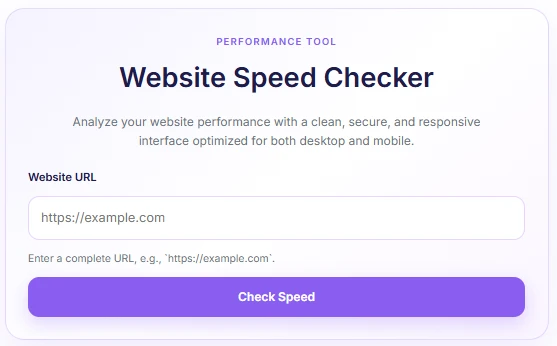
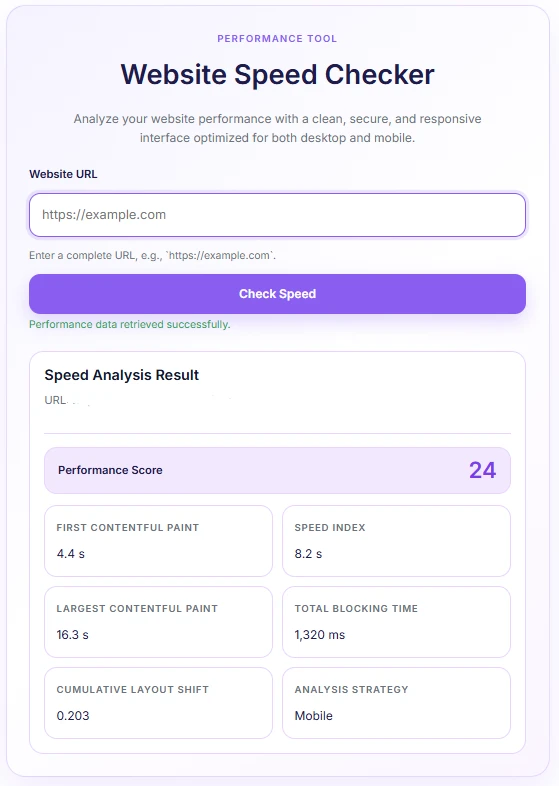
Instant Performance Analysis: Measures essential Google PageSpeed/Lighthouse Core Web Vitals, including Performance Score, First Contentful Paint (FCP), Speed Index, Largest Contentful Paint (LCP), Total Blocking Time (TBT), and Cumulative Layout Shift (CLS).
-
Asynchronous AJAX Execution: Runs performance tests in the background without reloading the page, providing a seamless user experience.
-
Modern Soft Purple Design: Fully responsive, mobile-optimized card layout styled in soft lavender tones that integrate cleanly into any site theme.
-
Built-in Security & Validation: Includes server-side URL sanitization, domain validation (restricting internal/private IP checks), and WordPress nonce verification to prevent abuse.
-
Lightweight & Inline Loading: Zero external stylesheet dependencies; CSS and JavaScript are enqueued inline only when the shortcode is present on the page.
Ideal For
-
Digital Agencies & Freelancers: Showcasing live performance audit tools to potential client leads.
-
Web Hosting & SEO Services: Providing quick value-add diagnostics on service or landing pages.
-
Tech Blogs & Resource Hubs: Offering visitors a free, interactive web utility to test site speeds directly on-site.
Key Benefits
-
Increases On-Site Engagement: Keeps visitors on your website longer by providing interactive utility tools.
-
Zero Theme Conflict: Scoped CSS variables and isolated Javascript logic prevent style leaks and script errors across different WordPress themes.
-
Optimized Loading: Assets load strictly on demand, ensuring your own site’s performance remains unaffected.
Installation Guide
You can set up this snippet in a few simple steps:
Method 1: Using the Code Snippets Plugin (Recommended)
-
Install and activate the Code Snippets plugin from the WordPress plugin directory.
-
Go to Snippets > Add New in your WordPress dashboard.
-
Title your snippet (e.g., Remove Background Tool) and select PHP Snippet.
-
Paste the complete PHP code into the editor.
-
Replace
'YOUR_WEBSITE_SPEED_CHECKER_API_KEY_HERE'in the code with your actual API key from www.googleapis.com. -
Click Save Changes and Activate.
Method 2: Via Theme functions.php
-
Navigate to Appearance > Theme File Editor in your dashboard (or access via FTP/cPanel).
-
Open the
functions.phpfile of your active Child Theme. -
Paste the code at the bottom of the file and insert your API Key.
-
Click Update File.
How to Display the Tool on Your Site:
Simply place the following shortcode on any Page, Post, or Widget:
[website_speed_checker]Compatibility
-
WordPress Version: 5.6 or higher.
-
PHP Version: 7.4 or higher (including PHP 8.x).
-
Page Builders: Compatible with Elementor, Divi, Gutenberg, Beaver Builder, and classic shortcode blocks.
What You Will Get
-
A ready-to-use WordPress snippet requiring no external plugin build processes.
-
A fully functional, AJAX-powered Website Speed Checker widget.
-
Integrated Google PageSpeed Insights API (v5) parser logic.
-
Clean, customizable soft-purple frontend styles out of the box.
FAQ (Frequently Asked Questions)
-
Q: Do I need a Google PageSpeed API Key?
-
Yes. While the Google PageSpeed API allows low-volume testing without a key, Google enforces rate limits. To ensure uninterrupted service, insert your own Google Cloud API Key into the
wsc_get_pagespeed_api_key()function.
-
-
Q: Can users test local URLs like
localhost?-
A: No. Security validation blocks internal, private, and loopback IP addresses to prevent Server-Side Request Forgery (SSRF) vulnerabilities.
-
-
Q: Does this plugin slow down my website?
-
A: No. CSS and JavaScript assets are loaded conditionally only on pages where the shortcode is embedded.
-
Disclaimers & Notes
- Always replace the default placeholder string in
wsc_get_pagespeed_api_key()with your official Google PageSpeed Insights API key obtained from the Google Cloud Console to avoid rate limiting or API error responses.
Preview





Reviews
There are no reviews yet.