
Key Features
-
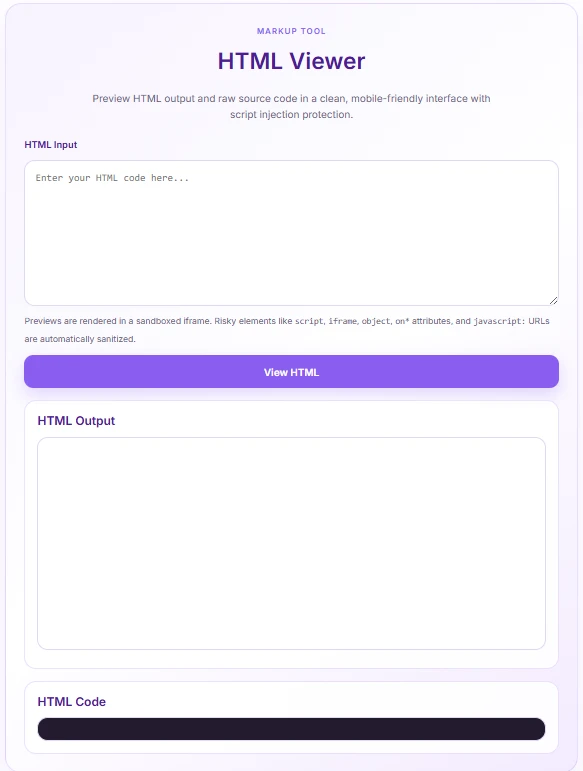
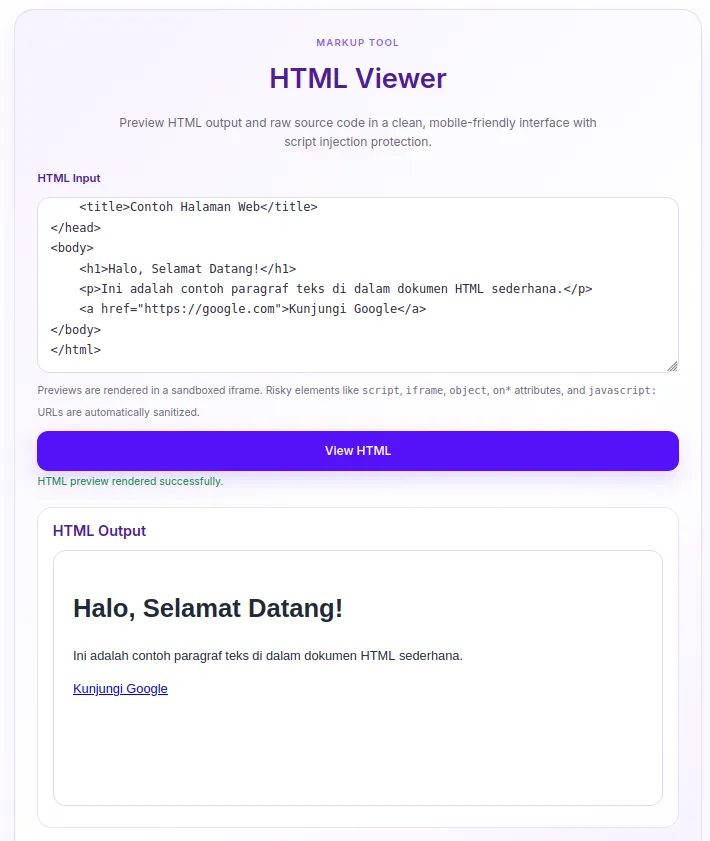
Instant Live Preview: Immediately view rendered HTML inside a isolated sandbox environment.
-
Built-in Security Sanitization: Automatically strips out hazardous tags (such as
<script>,<iframe>,<object>) and malicious inline event handlers (onclick,javascript:URLs) to prevent XSS attacks. -
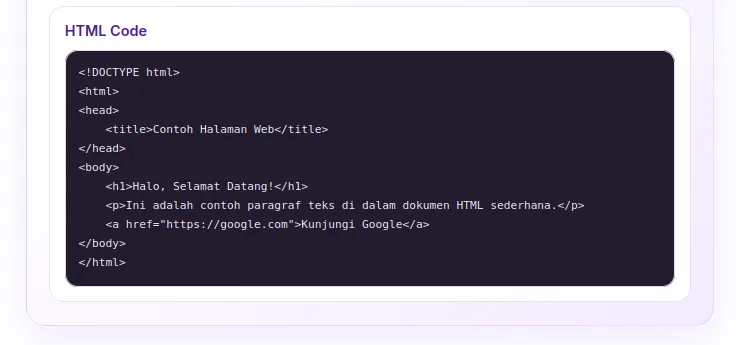
Dual Output View: Displays both the rendered HTML result and formatted raw source code simultaneously.
-
Modern Soft-Purple UI: Designed with an aesthetic lavender gradient theme that fits seamlessly into contemporary websites.
-
Fully Responsive & Lightweight: Mobile-friendly structure loaded with inline assets to ensure zero impact on overall page load speed.
Ideal For
-
Web Developers & Designers: Quickly test HTML snippets, email templates, or UI components without leaving the site.
-
Content Creators & Bloggers: Verify raw markup formatting before publishing posts or pages.
-
Coding Tutors & Students: Teach and learn basic HTML markup safely in an interactive, real-time environment.
-
Online Tool Websites: Add a free, useful utility to your digital toolbox or web developer resource site.
Key Benefits
-
100% Safe Execution: Prevents accidental script injection or site-breaking layouts thanks to its automated HTML parser and sandboxed iframe output.
-
No Theme Dependency: Built as a standalone shortcode snippet, meaning it won’t break or lose functionality when you switch WordPress themes.
-
Fast Performance: Zero external library dependencies—utilizes native browser DOM parsing and vanilla JavaScript for lightning-fast execution.
Installation Guide
You can set up this snippet in a few simple steps:
Method 1: Using the Code Snippets Plugin (Recommended)
-
Install and activate the free Code Snippets plugin from the WordPress repository.
-
Go to Snippets → Add New in your WordPress dashboard.
-
Paste the provided PHP code into the code editor.
-
Set the code type to PHP Snippet.
-
Click Save Changes and Activate.
Method 2: Via Theme functions.php
-
Go to Appearance → Theme File Editor (or access your server via FTP/cPanel).
-
Open your active child theme’s
functions.phpfile. -
Paste the PHP code at the end of the file.
-
Save the file.
How to Display the Tool on Your Site:
Add a Shortcode Block and type:
[html_viewer]
Compatibility
-
WordPress Version: Compatible with WordPress 5.0 and higher (including Gutenberg & classic editor).
-
PHP Version: PHP 7.4 or higher (fully compatible with PHP 8.x).
-
Page Builders: Fully compatible with Elementor, Divi, Beaver Builder, WPBakery, and Block Editor.
-
Browsers: Works on all modern web browsers (Chrome, Edge, Safari, Firefox, Opera).
What You Will Get
-
Complete PHP Snippet: Fully functional PHP code ready for direct insertion into your theme or code manager.
-
Embedded CSS & JS Assets: Self-contained inline styles and scripts ensuring simple, error-free deployment.
-
Shortcode Access: Easy-to-use shortcode
[html_viewer]to place the tool on any page or post.
FAQ (Frequently Asked Questions)
-
Q: Is it safe to let visitors paste any HTML code?
-
A: Yes! The tool runs a built-in JavaScript sanitizer that strips dangerous tags (like
<script>,<iframe>,<object>) and inline JS events before rendering.
-
-
Q: Can I customize the purple theme to match my brand?
-
A: Absolutely. You can easily adjust the CSS custom variables (such as
--hv-purpleand--hv-bg) directly inside the snippet code.
-
-
Q: Does this plugin slow down my website?
-
A: Not at all. It uses standard WordPress asset enqueueing and lightweight vanilla JavaScript without heavy third-party libraries.
-
Disclaimers & Notes
-
Sandboxed Rendering: External links and embedded media requiring active scripts inside the preview iframe may be blocked intentionally for security purposes.
-
Styling Scoping: The preview area applies basic default styling (Arial font, responsive images, clean tables) so rendered HTML looks presentable out of the box.
Preview




Reviews
There are no reviews yet.