Key Features
-
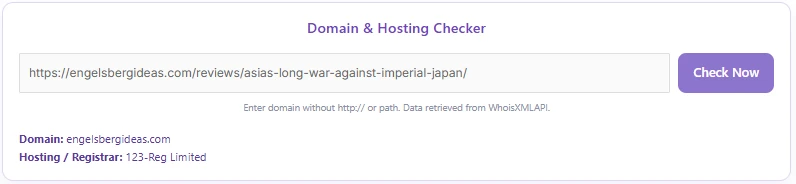
Instant WHOIS Lookup: Quickly retrieves domain registration and hosting provider/registrar information.
-
Modern Soft Purple UI: Pre-styled with a clean, responsive, soft purple card design that blends seamlessly into modern web layouts.
-
Real-time AJAX Processing: Performs queries asynchronously without requiring page reloads.
-
Interactive Loading State: Built-in loading spinner and dynamic button text (“Checking…”) provide immediate visual feedback.
-
Input Normalization & Validation: Automatically strips
http://,https://, and path trailing slashes, validating domain syntax before sending requests. -
Secure AJAX Architecture: Utilizes WordPress nonces and server-side request sanitization to prevent unauthorized abuse.
Ideal For
-
Web Development Agencies & Freelancers: Easily audit client domain/hosting infrastructure during onboarding.
-
SEO & Digital Marketing Specialists: Quickly check web properties and competitor registrar setups.
-
Webmaster Toolkits & Blogs: Provide a helpful, interactive utility directly on your website for visitors.
-
Domain Brokers & Investors: Verify registrar data on potential domain acquisitions.
Benefits of the Plugin
-
Boosts User Engagement: Keeps visitors on your site longer by offering a free, functional web tool.
-
Zero Database Overhead: Executes queries externally via API without clogging your WordPress database tables.
-
Plug-and-Play Setup: Simply paste a shortcode onto any page or post—no complex configuration needed.
-
Fully Customizable: Clean PHP, CSS, and JS structure makes it easy to adjust colors or extend styling.
Installation Guide
You can set up this snippet in a few simple steps:
Method 1: Using the Code Snippets Plugin (Recommended)
-
Install and activate the Code Snippets plugin from the WordPress plugin directory.
-
Go to Snippets > Add New in your WordPress dashboard.
-
Title your snippet (e.g., Remove Background Tool) and select PHP Snippet.
-
Paste the complete PHP code into the editor.
-
Replace
'WHOISXMLAPI_KEY'in the code with your actual API key from WhoisXMLAPI. -
Click Save Changes and Activate.
Method 2: Via Theme functions.php
-
Navigate to Appearance > Theme File Editor in your dashboard (or access via FTP/cPanel).
-
Open the
functions.phpfile of your active Child Theme. -
Paste the code at the bottom of the file and insert your API Key.
-
Click Update File.
How to Display the Tool on Your Site:
Simply place the following shortcode on any Page, Post, or Widget:
[domain_hosting_checker]Compatibility
-
WordPress Version: 5.0 or higher (Fully compatible with Gutenberg and Classic Editor).
-
PHP Version: PHP 7.4 or higher (including PHP 8.x).
-
Browsers: Modern browsers (Chrome, Firefox, Safari, Edge) with JavaScript enabled.
-
Themes: Compatible with all standard WordPress themes and page builders (Elementor, Divi, Beaver Builder, etc.).
What You Get
-
Complete PHP script with secure WordPress AJAX hooks.
-
Embedded CSS styling featuring a soft purple aesthetic and loading spinner animations.
-
Lightweight Vanilla JavaScript logic for smooth frontend interactions.
-
Pre-configured WhoisXMLAPI endpoint integration.
FAQ (Frequently Asked Questions)
-
Q: Do I need an API key to use this plugin?
-
A: Yes, this tool relies on WhoisXMLAPI to fetch domain and registrar data. You need to insert your own API key into the WHOISXMLAPI_KEY constant in the code.
-
-
Q: Is there a free tier for the API?
-
A: WhoisXMLAPI offers a free tier with a limited number of requests per month upon sign-up.
-
-
Q: Can I change the soft purple design?
-
A: Yes. All styles are defined inside the <style> tag in the code. You can modify the CSS color codes to match your brand guidelines.
-
Notes
-
API Rate Limits: Ensure your API subscription account has sufficient query limits to handle expected traffic.
-
Data Privacy: Domain lookup privacy protection (e.g., WhoisGuard) on target domains may conceal the registrar’s public identity; in such cases, the tool will report the proxy registrar or “Not Found”.
Preview



Reviews
There are no reviews yet.