Key Features
-
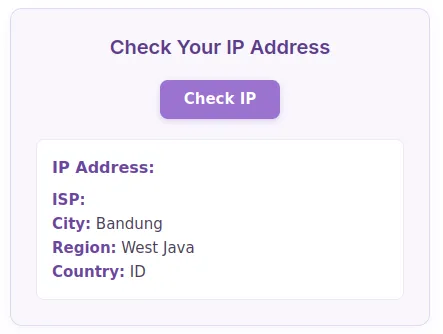
Instant IP & Location Lookup: Fetch IP address, ISP, city, region, and country in real-time.
-
AJAX-Powered Execution: Fetches location details asynchronously without requiring a page refresh.
-
Shortcode-Ready: Easily embed the tool anywhere using
[ip_location_checker]. -
Soft Purple UI Design: Modern, clean, and fully responsive layout pre-styled out of the box.
-
Non-Intrusive & Fast: Optimized code execution with zero impact on overall page load speed.
Ideal For
-
Network & IT Websites: Web utilities, IP lookup tools, and developer resources.
-
VPN & Proxy Services: Platforms helping users verify their active network connections.
-
Cybersecurity Blogs: Tech portals looking for interactive, value-add widgets for readers.
-
SaaS & E-commerce Sites: Customer support pages needing quick user network diagnostics.
Key Benefits
-
Higher Engagement: Interactive utilities keep visitors active on your site longer.
-
Zero Configuration: Plug-and-play code that works instantly without complex settings.
-
Full Customizability: Easily tweak CSS styles or translation strings to match your brand.
Installation Guide
You can set up this snippet in a few simple steps:
Method 1: Using the Code Snippets Plugin (Recommended)
-
Install and activate the Code Snippets plugin from the WordPress plugin directory.
-
Go to Snippets > Add New in your WordPress dashboard.
-
Title your snippet (e.g., IP Location) and select PHP Snippet.
-
Paste the complete PHP code into the editor.
-
Replace
'YOUR_URL_IP_LOCATION_HERE'in the code with your actual API key from ipinfo.io. -
Click Save Changes and Activate.
Method 2: Via Theme functions.php
-
Navigate to Appearance > Theme File Editor in your dashboard (or access via FTP/cPanel).
-
Open the
functions.phpfile of your active Child Theme. -
Paste the code at the bottom of the file and insert your API Key.
-
Click Update File.
How to Display the Tool on Your Site:
Simply place the following shortcode on any Page, Post, or Widget:
[ip_location_checker]Compatibility
-
WordPress Versions: WordPress 5.0 or higher (fully compatible with WordPress 6.x).
-
PHP Versions: PHP 7.4 up to PHP 8.3+.
-
Page Builders: Compatible with Elementor, Divi, Gutenberg, Beaver Builder, and Classic Editor.
-
Browsers: Modern web browsers including Chrome, Firefox, Safari, and Edge.
What You Will Get
-
Complete PHP shortcode script integrated with WordPress AJAX.
-
Pre-configured JavaScript fetch requests connecting to the
ipinfo.ioAPI. -
Embedded, soft purple CSS styling for immediate frontend display.
FAQ (Frequently Asked Questions)
-
Q: Does this plugin require an API key?
-
A:No. It utilizes the free tier of the
ipinfo.ioAPI automatically.
-
-
Q: Can I customize the colors and fonts?
-
A: Yes, all styles are located within the
<style>block inside the snippet and can be edited freely.
-
Disclaimers & Notes
- The default setup relies on
ipinfo.iofree rate limits. For extremely high-traffic websites, appending a free personal API token to the fetch URL is recommended to avoid rate-limiting issues.
Preview





Reviews
There are no reviews yet.