
Key Features
-
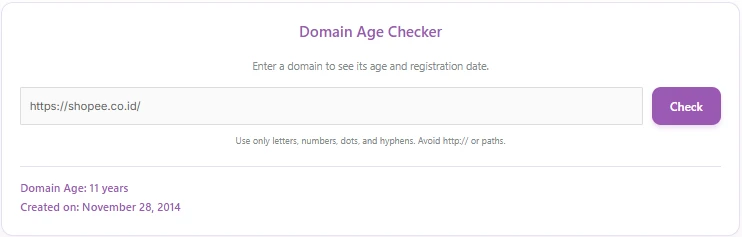
Instant Domain Age Retrieval: Calculates the exact domain age in years using real-time WHOIS registry data.
-
Registration Date Display: Displays formatted creation dates (e.g., Creation Date: January 1, 2020).
-
Asynchronous AJAX Requests: Processes checks smoothly without reloading the web page.
-
Automatic Domain Normalization: Automatically strips
http://,https://, and URL sub-paths from user inputs. -
Built-in Security & Validation: Integrated with WordPress nonces and strict regex pattern matching to prevent malicious inputs.
-
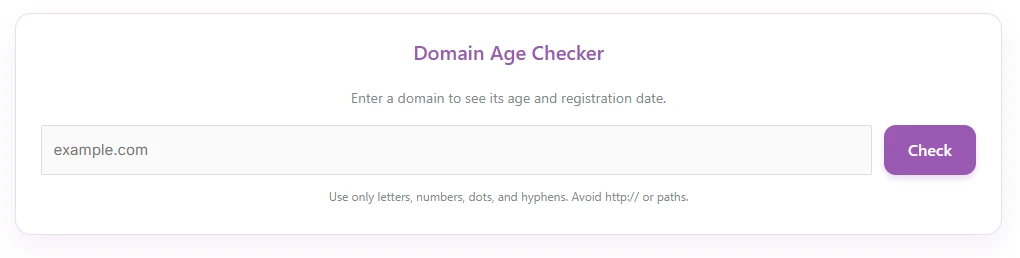
Soft Purple UI Design: Clean, modern card layout with responsive styling that integrates seamlessly with most WordPress themes.
Ideal For
-
SEO Agencies & Consultants: Offer free domain evaluation tools to attract prospective clients.
-
Domain Brokers & Flippers: Quickly verify domain age and history before placing bids or listing domains for sale.
-
Digital Marketing Blogs: Increase audience engagement and time-on-site by embedding a useful web utility.
-
Web Hosting & Registrar Websites: Provide helpful pre-purchase or domain transfer checks for customers.
Key Benefits
-
Zero Bloat: Pure PHP, CSS, and Vanilla JS code without heavy external JavaScript libraries or framework dependencies.
-
Enhanced User Engagement: Adds interactive utility to your site, boosting organic traffic and visitor retention.
-
Simple Integration: Easily embed the tool on any page, post, or widget area via a simple shortcode.
-
API Efficiency: Direct integration with WhoisXMLAPI ensures high accuracy and reliable response rates.
Installation Guide
You can set up this snippet in a few simple steps:
Method 1: Using the Code Snippets Plugin (Recommended)
-
Install and activate the Code Snippets plugin from the WordPress plugin directory.
-
Go to Snippets > Add New in your WordPress dashboard.
-
Title your snippet (e.g., Domain Age Checker) and select PHP Snippet.
-
Paste the complete PHP code into the editor.
-
Replace
'YOUR_DOMAIN_AGE_CHECKER_KEY_HERE'in the code with your actual API key from whoisxmlapi.com. -
Click Save Changes and Activate.
Method 2: Via Theme functions.php
-
Navigate to Appearance > Theme File Editor in your dashboard (or access via FTP/cPanel).
-
Open the
functions.phpfile of your active Child Theme. -
Paste the code at the bottom of the file and insert your API Key.
-
Click Update File.
How to Display the Tool on Your Site:
Simply place the following shortcode on any Page, Post, or Widget:
[domain_age_checker]Compatibility
-
WordPress Versions: WordPress 5.0 or higher (fully compatible with WordPress 6.x).
-
PHP Versions: PHP 7.4 up to PHP 8.3+.
-
Page Builders: Compatible with Elementor, Divi, Gutenberg, Beaver Builder, and Classic Editor.
-
Browsers: Modern web browsers including Chrome, Firefox, Safari, and Edge.
What You Will Get
-
Complete Source Code: Fully customized, commented PHP, CSS, and JavaScript snippet ready for deployment.
-
WHOIS XML API Integration: Pre-configured API routing structure for seamless server-to-server communication.
-
Responsive UI Interface: Styled card layout featuring the soft purple theme.
FAQ (Frequently Asked Questions)
-
Q: Do I need an API key to use this tool?
-
A:Yes. The snippet utilizes WhoisXMLAPI to fetch domain data. You can sign up for a free account on WhoisXMLAPI to receive your own API key.
-
-
Q: Where do I insert my API key?
-
A: Locate the line
define('WHOISXMLAPI_KEY_AGE', 'YOUR_DOMAIN_AGE_CHECKER_KEY_HERE');near the top of the PHP code and replace the default string with your key.
-
-
Q: Why does a domain show “Domain Age: not available”?
-
A: Some country-code TLDs (ccTLDs) or restricted registries mask or omit public creation dates due to privacy regulations.
-
Disclaimers & Notes
-
Child Theme Usage: If adding the code directly to
functions.php, always use a child theme so changes are not overwritten during theme updates. -
API Rate Limits: Ensure your WhoisXMLAPI plan has adequate query credits if your website experiences high traffic volume.
Preview




Reviews
There are no reviews yet.