Key Features
-
Automated Background Processing (Remove.bg API): Connects directly with the remove.bg API to instantly remove image backgrounds with high accuracy and precision.
-
Asynchronous Processing (AJAX Fetch): Uploads, processes, and displays results in real time without refreshing or reloading the web page.
-
Supported Formats & Size Limit: Compatible with standard image formats (JPG, PNG, and WEBP) with a maximum upload capacity of up to 12 MB.
-
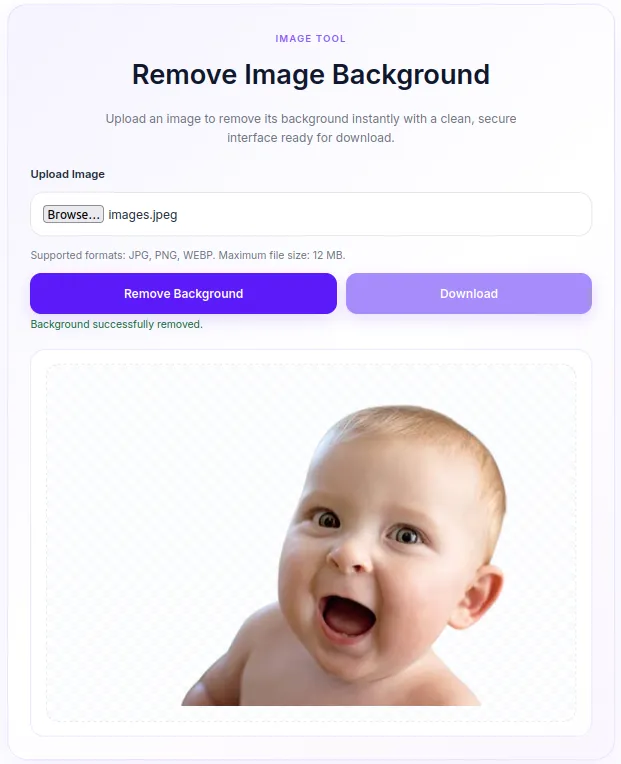
Checkerboard Pattern Preview: Instant preview of the background-removed image over a transparent checkerboard pattern before downloading.
-
Strict Security & Validation: Integrated with WordPress Nonce verification, MIME type checking, file size validation, and file sanitization to prevent potential security threats.
-
Modern Soft Purple UI Design: Clean, responsive card-based layout featuring a soft purple color scheme that adapts smoothly across Desktop, Tablet, and Mobile devices.
-
Lightweight & No External Dependencies: Includes built-in inline CSS and JS loaded conditionally only on pages where the shortcode is present.
Ideal For
-
E-Commerce & Online Stores: Helps sellers and visitors quickly clean up product image backgrounds.
-
Blogs & Media Portals: A handy utility for content creators and designers needing quick transparent PNG assets.
-
Agencies & Freelance Websites: Functions as a valuable free lead magnet to drive traffic and engagement to your agency site.
-
Online Utility Hubs: Easily expand your collection of interactive web tools built directly inside WordPress.
Key Benefits
-
Boost Engagement & On-Site Time: Offers a useful tool that keeps visitors engaged longer on your website (increases time-on-site).
-
Zero Server Overhead: Image processing AI is handled offsite by remove.bg, leaving your web server fast and unburdened.
-
Easy Implementation & Customization: Simple shortcode deployment with customizable CSS variables to match your brand styling.
-
Seamless User Experience: Automatic download button activation immediately after image processing completes.
Installation Guide
You can set up this snippet in a few simple steps:
Method 1: Using the Code Snippets Plugin (Recommended)
-
Install and activate the Code Snippets plugin from the WordPress plugin directory.
-
Go to Snippets > Add New in your WordPress dashboard.
-
Title your snippet (e.g., Remove Background Tool) and select PHP Snippet.
-
Paste the complete PHP code into the editor.
-
Replace
'YOUR_REMOVE_BG_API_KEY_HERE'in the code with your actual API key from remove.bg. -
Click Save Changes and Activate.
Method 2: Via Theme functions.php
-
Navigate to Appearance > Theme File Editor in your dashboard (or access via FTP/cPanel).
-
Open the
functions.phpfile of your active Child Theme. -
Paste the code at the bottom of the file and insert your API Key.
-
Click Update File.
How to Display the Tool on Your Site:
Simply place the following shortcode on any Page, Post, or Widget:
[remove_bg_tool]Compatibility
-
WordPress Version: Fully compatible with WordPress 5.6 up to the latest version (6.x+).
-
PHP Version: Works smoothly on PHP 7.4, 8.0, 8.1, 8.2, and 8.3+.
-
Server Requirements: Requires the PHP cURL extension to be enabled on your server.
-
Page Builders: Compatible with Gutenberg, Elementor, Divi, Beaver Builder, Bricks Builder, and standard WordPress themes.
-
Browsers: Fully tested across Google Chrome, Mozilla Firefox, Safari, Edge, and Opera.
What You Will Get
-
Clean PHP Snippet Source Code: Well-documented and secured according to WordPress Coding Standards.
-
Integrated CSS & JS Assets: Includes the Soft Purple UI styles and AJAX upload handler script out of the box.
-
Validation & Error Handling: User-friendly notification alerts for invalid file types, size exceedances, or API issues.
-
Quick Start Guide: Concise instructions for setup and shortcode usage.
FAQ (Frequently Asked Questions)
-
Q: Do I need a remove.bg API key?
-
A: Yes. This tool connects to the remove.bg service, so you will need a free or paid API key from remove.bg to set in the
RBG_API_KEYconstant inside the code.
-
-
Q: What file formats are supported?
-
A: The tool supports JPG, JPEG, PNG, and WEBP file formats up to 12 MB in size.
-
-
Q: Will this slow down my hosting server?
-
A: No. The heavy image processing is handled externally via the remove.bg API, and frontend assets are conditionally enqueued only where the shortcode appears.
-
-
Q: Can I change the theme colors?
-
A: Absolutely! You can easily update CSS variables like
--rbg-purpleand--rbg-purple-darkinside the stylesheet block to match your website branding.
-
Disclaimers & Notes
-
PHP cURL Extension: Ensure
curl_initandcurl_file_createfunctions are enabled on your server (enabled by default on almost all hosting providers). -
Child Theme Recommendation: If adding code to
functions.php, always use a Child Theme to ensure your custom snippet isn’t erased during parent theme updates. -
API Usage & Limits: Processing volume and speed are governed by the limits and credits of your remove.bg account plan.
Preview

Reviews
There are no reviews yet.