
Key Features
-
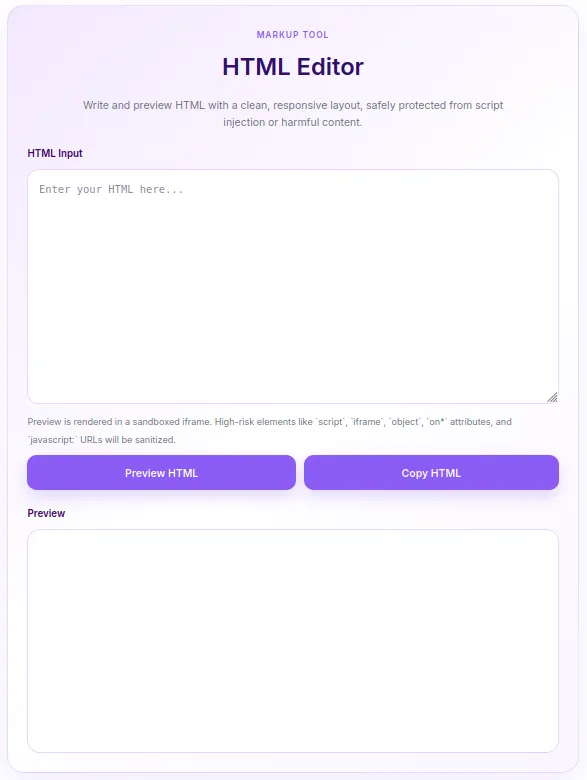
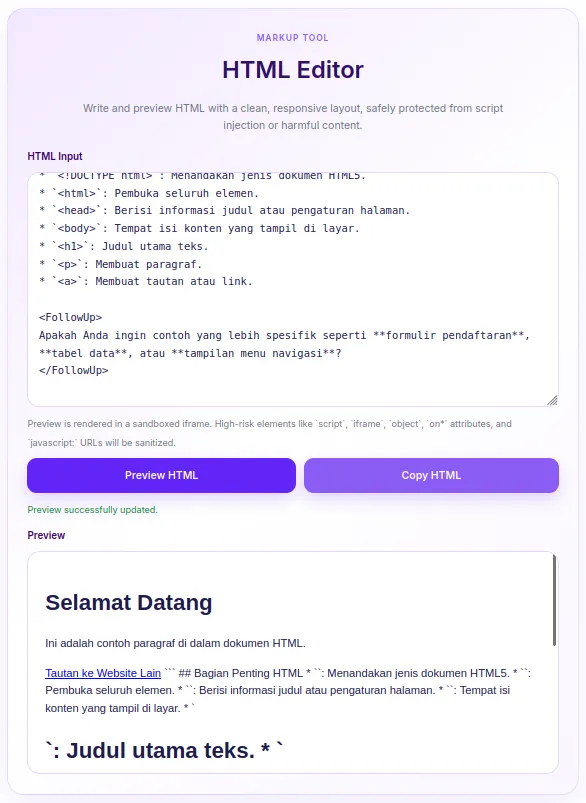
Real-time Live Preview: Instantly visually render your HTML code inside a sandboxed iframe with a single click.
-
Smart HTML Sanitization: Built-in client-side parser automatically strips high-risk elements (e.g.,
<script>,<iframe>,<object>, inline event handlers likeonloadoronclick, and dangerousjavascript:links) to prevent Cross-Site Scripting (XSS). -
One-Click Copy: Easily copy your raw HTML code to the clipboard with visual confirmation.
-
Sleek Soft Purple UI: Designed with modern aesthetics, clean typography, soft lavender gradient backgrounds, and responsive controls.
-
Sandboxed Rendering: Previews render safely inside an isolated iframe, preventing external CSS from bleeding out or messing up your main page layout.
-
Lightweight & Fast: Zero heavy external dependencies or bloat. Loads inline CSS/JS only when the shortcode is present.
-
Shortcode-based Flexibility: Deploy anywhere on your WordPress site—pages, posts, custom widget areas, or member dashboards using
[html_editor].
Ideal For
-
Web Developers & Designers: Quickly test HTML snippets, email signatures, or UI components without leaving WordPress.
-
Content Creators & Bloggers: Safely preview custom formatted text, tables, callout boxes, or buttons before inserting them into posts.
-
SaaS & Membership Portals: Provide your users/subscribers with an interactive front-end markup tool or code sandbox.
-
Teachers & Educators: Offer a safe playground for students learning basic HTML and web formatting.
Key Benefits
-
Enhanced Security: Keeps your site safe by running code inside a sandboxed environment while filtering out harmful scripts.
-
Improved Productivity: No need to switch back and forth between external editors (like CodePen or JSFiddle)—edit and test directly on your WordPress site.
-
Seamless User Experience: Responsive design ensures perfect functionality across desktop, tablet, and mobile devices.
-
Zero Configuration Required: Simply copy, paste, and use immediately with the
[html_editor]shortcode.
Installation Guide
You can set up this snippet in a few simple steps:
Method 1: Using the Code Snippets Plugin (Recommended)
-
Install and activate the free Code Snippets plugin from the WordPress repository.
-
Go to Snippets → Add New in your WordPress dashboard.
-
Paste the provided PHP code into the code editor.
-
Set the code type to PHP Snippet.
-
Click Save Changes and Activate.
Method 2: Via Theme functions.php
-
Go to Appearance → Theme File Editor (or access your server via FTP/cPanel).
-
Open your active child theme’s
functions.phpfile. -
Paste the PHP code at the end of the file.
-
Save the file.
How to Display the Tool on Your Site:
Add a Shortcode Block and type:
[html_editor]
Compatibility
-
WordPress Version: Compatible with WordPress 5.0 and higher (including WP 6.x).
-
PHP Version: Supports PHP 7.4 up to PHP 8.3+.
-
Page Builders: Compatible with Elementor, Divi, Gutenberg (Block Editor), Beaver Builder, WPBakery, and classic editors.
-
Browsers: Full support for modern browsers (Google Chrome, Mozilla Firefox, Safari, Microsoft Edge, and Opera).
What You Will Get
-
Complete Single-File PHP Code: Clean, documented, and production-ready code combining the shortcode logic, CSS, and JS.
-
Custom Shortcode (
[html_editor]): Ready-to-use tag for effortless front-end integration. -
Built-in Styling & Scripting: Fully self-contained soft purple theme and sanitization scripts.
-
Lifetime Usage: Unlimited implementation across personal and client websites.
FAQ (Frequently Asked Questions)
- Q: Can users run JavaScript inside the editor preview?
- A: No. For security reasons, script execution,
<script>tags, inline event handlers (likeonloadoronclick), andjavascript:URLs are automatically stripped before rendering.
- A: No. For security reasons, script execution,
- Q: Will the preview styling affect my website’s actual CSS?
- A: No. The preview renders inside a sandboxed
<iframe>, isolating its CSS completely from your main theme’s styles.
- A: No. The preview renders inside a sandboxed
- Q: Can I change the shortcode name?
- A: Yes! You can modify
[html_editor]by changing the shortcode handle in the PHP snippet functionadd_shortcode('your_custom_shortcode', 'he_render_html_editor_shortcode');.
- A: Yes! You can modify
- Q: Is this tool mobile-friendly?
- A: Yes, the UI features a responsive layout that automatically adjusts to smaller viewports, stacking buttons vertically on mobile devices.
Disclaimers & Notes
-
Sanitization Disclaimer: While the built-in sanitization blocks high-risk XSS vectors, this editor is intended for HTML/CSS previewing and editing, not for hosting untreated untrusted user inputs directly into your site’s main database.
-
Browsers & Clipboard Access: The “Copy HTML” feature relies on standard browser Clipboard API permissions. Ensure your site runs over HTTPS for optimal clipboard functionality in modern browsers.
Preview





Reviews
There are no reviews yet.