Key Features
-
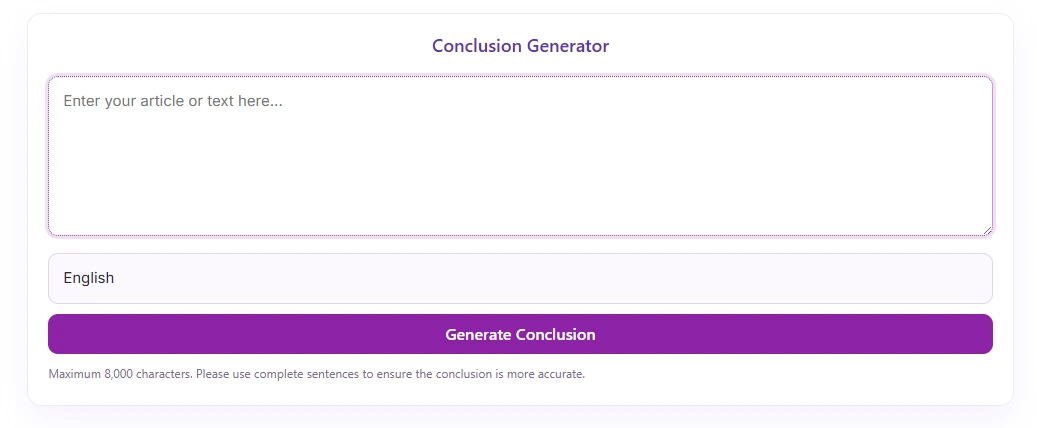
Clean Front-End Interface: An attractive, card-style interface that matches modern web aesthetics.
-
Ready-to-Integrate: Clear placeholders within the JavaScript code show exactly where to add your API endpoint and key.
-
Simple Shortcode: Easily embed the generator anywhere on your site using
[conclusion_generator]. -
Language & UI Updated: All labels, hints, and error messages are now in English for global use.
-
Input Validation: Checks for empty input and a maximum character limit of 8,000.
-
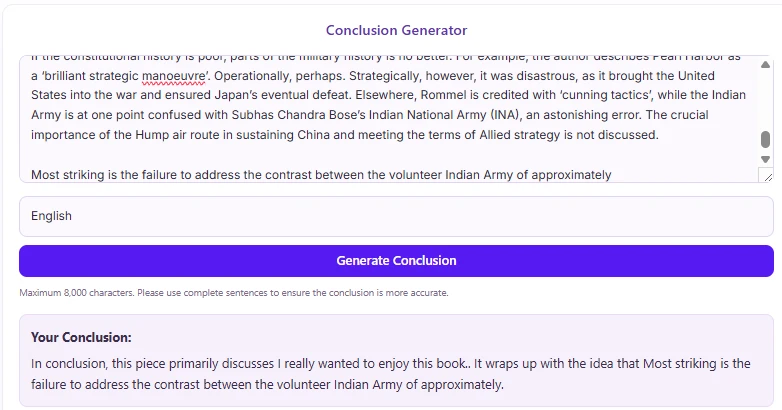
UI States: Includes full ‘Loading’ and ‘Error’ states for a smooth user experience during asynchronous calls.
Ideal For
-
Developers: Looking for a structural starting point to build an AI-powered tool.
-
Content Creators: Who want a dedicated space to draft and then later integrate a tool to automatically generate summaries for their articles.
-
Agencies: Building custom tools for clients who require AI functionality.
Key Benefits
- Time Saver: Get a pre-styled, functional user interface immediately.
-
Flexible: Not locked into one specific AI provider; you can integrate any API of your choice.
-
Improved UX: Professional look and feel, including dynamic loading feedback for the user.
-
Scalable: A solid foundation for building more advanced AI features (like summary length adjustment or tone selection).
Installation Guide
You can set up this snippet in a few simple steps:
Method 1: Using the Code Snippets Plugin (Recommended)
-
Install and activate the Code Snippets plugin from the WordPress plugin directory.
-
Go to Snippets > Add New in your WordPress dashboard.
-
Title your snippet (e.g., Conclusion Generator Tool) and select PHP Snippet.
-
Paste the complete PHP code into the editor.
-
Click Save Changes and Activate.
Method 2: Via Theme functions.php
-
Navigate to Appearance > Theme File Editor in your dashboard (or access via FTP/cPanel).
-
Open the
functions.phpfile of your active Child Theme. -
Click Update File.
How to Display the Tool on Your Site:
Simply place the following shortcode on any Page, Post, or Widget:
[conclusion_generator]
Compatibility
-
WordPress: Tested with WordPress 5.8+ (and compatible with newer versions).
-
Themes: Compatible with all standard WordPress themes and major page builders (Elementor, Gutenberg, Divi).
What You Will Get
-
A fully functional front-end component for your WordPress site.
-
A pre-styled, responsive user interface.
-
Documented code with clear sections for API integration.
FAQ (Frequently Asked Questions)
-
Q:Does this plugin automatically use OpenAI (ChatGPT)?
-
A: No. The current version provides a structural placeholder. You must manually update the JavaScript code with your own API endpoint and key to make actual AI requests.
-
-
Q: Where do I add my API key?
-
A: You need to edit the plugin files and locate the
async function fetchAIConclusion(text)block. This is where you would add yourfetch()request and include your API key in the headers.
-
-
Q: Will this slow down my hosting server?
-
A: No. The heavy image processing is handled externally via the remove.bg API, and frontend assets are conditionally enqueued only where the shortcode appears.
-
-
Q: Can I change the character limit?
-
A: Yes, you can modify the
maxlengthattribute in the HTML textarea and the corresponding check in the JavaScript code within the plugin file.
-
Disclaimers & Notes
-
This plugin provides the interface and structural code only. A working API subscription and endpoint for an external AI service are required to generate actual, coherent conclusions.
-
Ensure that you handle API keys securely if you decide to modify the client-side code, or implement a proper server-side proxy for maximum security.
Preview



Reviews
There are no reviews yet.